How to Use the Soap Calculator
A plain-language guide for beginners. Follow along from top to bottom — the calculator is designed to walk you through each step in order.
In This Guide
1 Loading a Saved Recipe
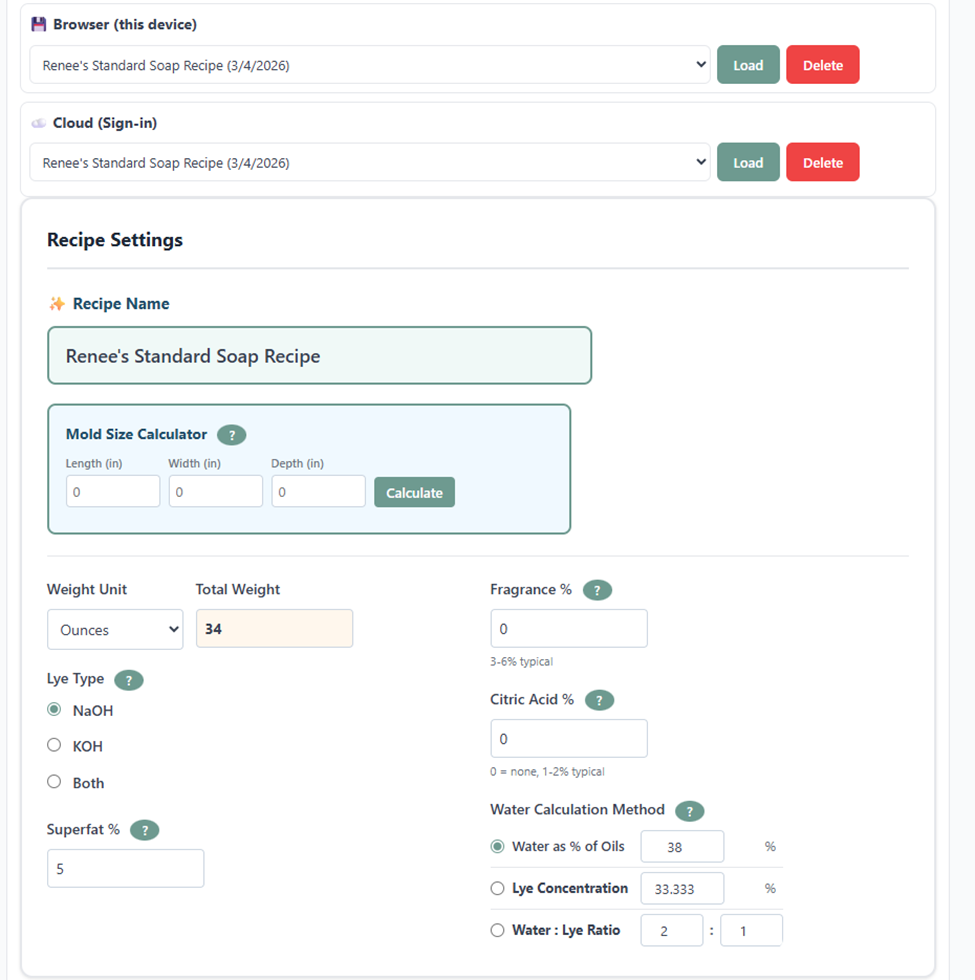
At the very top of the calculator you'll see two load options: Browser (this device) and Cloud (Sign-in).
- Browser - saves recipes locally to your current device/browser. Free to use, but note that recipes won't appear on other devices.
- Cloud - saves to your Studio For Makers account. Access your recipes from any device. Requires a paid plan.
Pick a recipe from the dropdown and click Load to bring it back into the calculator. This is handy when you want to resize a batch, swap an oil, or print a recipe you already love.
2 Recipe Name & Mold Size Calculator
Recipe Name
Give your recipe a name before you save. This is how it will appear in your load dropdown. Be descriptive - "Lavender Shea Bar" is better than "Soap 1."
Mold Size Calculator
Not sure how much soap to make? Enter the Length, Width, and Depth in inches and click Calculate. The calculator will tell you exactly how many ounces of soap batter you need to fill it.
Once you get a result, click Use Amount → to automatically fill in your Total Weight.
• Measure the inside of the mold, width and length, as well as the height, not the outside.
• For loaf molds, depth is how tall you want the soap, usually 2–3 inches.
• Round up slightly (by 50–100g) if you like to add decorative swoops on top - you'll want a little extra batter.
• Consider pouring any leftover batter into a small cavity mold for samples or testers.
3 Recipe Settings
Weight Unit & Total Weight
Choose whether to work in Ounces, Grams, or Pounds. Then enter your total oil weight - this is the total amount of oils in your recipe (not including water or lye).
Lye Type
Lye is the ingredient that turns the oils into soap. (Saponification!) The type you use depends on what you're making:
- NaOH (Sodium Hydroxide) - makes solid bar soap. The most common choice for beginners.
- KOH (Potassium Hydroxide) - makes liquid soap. You can also choose 90% or 100% purity.
- Both (Dual Lye) - a blend of NaOH and KOH. Used for creamy bars and shaving soaps.
Superfat %
Superfat is the percentage of oils left unsaponified - meaning they don't get converted to soap. These leftover oils stay in your bar and make it feel more moisturizing on skin.
The default is 5%. Here's a quick reference:
7–8% superfat
3% superfat
5% superfat (default)
15–20% superfat
Fragrance %
Enter fragrance as a percentage of your total oil weight. The calculator will show you exactly how much to add after you click Calculate.
2–3%
3–5%
5–6%
6% max
Essential oils also have safe usage limits - many are not safe to use in soap at all. Check before you use and read supplier information for this. Read reviews on your supplier's website to see if a fragrance accelerates trace or causes discoloration.
Citric Acid %
Citric acid is an optional additive. When it reacts with lye, it forms sodium citrate - a mild chelator that helps reduce soap scum and may protect your soap from going rancid (DOS). It's especially useful in hard water areas.
A typical usage is 1–2% of oil weight. The calculator automatically adds any extra lye needed to neutralize the acid - you don't have to do any math.
4 Water Calculation Method
You have three ways to tell the calculator how much water to use. They all describe the same relationship differently - pick whichever makes the most sense to you.
Water as % of Oils (Default: 38%)
Water equals a percentage of your total oil weight. The default 38% is the traditional starting point for Hot Processed Soap, but most Cold Process soapers don't actually need that much water. Reducing to 33% or lower makes a creamier, less grainy bar.
Lye Concentration (Recommended)
This tells you what percentage of your lye solution is actually lye. The remaining percentage is water. For example:
- 33% lye concentration = your solution is 33% lye and 67% water - a balanced starting point.
- 30–31% = more water → slower trace, more time to design, longer cure.
- 35–38% = water discount → faster trace, quicker to unmold, shorter cure.
- 40% = very fast trace - good for simpler pours.
- 50% = maximum concentration (1:1). Advanced technique only - lye may not fully dissolve.
Water : Lye Ratio
This is just another way to express lye concentration. A 33% concentration equals a 2:1 ratio (2 parts water to 1 part lye). For a water discount, use a lower ratio - 1.7:1 for example.
5 Selecting Your Oils
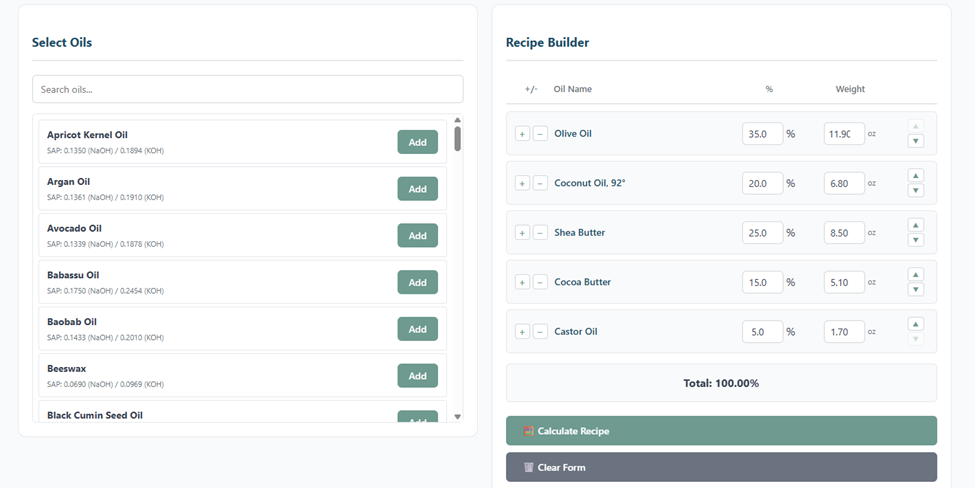
The oil selector panel shows every oil in the database, along with its SAP values - the numbers used to calculate exactly how much lye each oil needs. You don't need to memorize these; the calculator handles all the math.
Use the search box to quickly find an oil, then click Add to add it to your recipe.
Oil Categories - A Quick Reference (My recommended approach)
Hard Oils - creates hardness and a long-lasting bar:
- Coconut Oil: 15–30% (high cleansing, great lather - can be drying above 25%)
- Palm Oil: 20–30% (hardness, stable lather)
- Cocoa Butter: 10–15% (hardness, considered to be conditioning)
- Shea Butter: 5–30% (considered to beconditioning, and provides a creamy lather)
- Babassu Oil: 10–30% (similar to coconut but less drying)
- Rice Bran Oil: 5–15% (hardness, conditioning, can feel a bit sticky if over 15%)
- Mango Butter: 5–10% (conditioning, provides a smooth texture)
- Beef Tallow: 5–10% (conditioning, provides a hard bar)
Soft Oils - provides for a conditioning and moisturizing feel:
- Olive Oil: 30–70% (conditioning, mild - takes longer to cure)
- Avocado Oil: 10–30% (conditioning, creamy lather)
- Sweet Almond Oil: 10–20% (conditioning, mild)
- Sunflower Oil: 10–15% (conditioning, light, non-comedogenic but is susceptible to rancidity and DOS.)
- Grapeseed Oil: 5–10% (conditioning, light, can feel a bit sticky if over 10%)
Specialty Oils - adds unique properties:
- Castor Oil: Keep around 5-10% (boosts lather and slip, can feel sticky above that.)
- Jojoba Oil: 5–8% (feels conditioning)
- Hemp Seed Oil: 5–10% (conditioning, can feel a bit sticky if over 10%)
- Apricot Kernel Oil: 5–10% (conditioning, light)
Olive Oil 40% · Coconut Oil 25% · Palm Oil 30% · Castor Oil 5%
This is a classic balanced formula that produces a hard, long-lasting bar with both bubbly and creamy lather. It combines cleansing oils, conditioning oils, and hard fats for a well-rounded soap suitable for most skin types.
or
Olive Oil 50% · Coconut Oil 25% · Castor Oil 5% · Shea Butter 20%
A more conditioning bar with a creamy lather. Both are great starting points for beginners to experiment with. You can swap in other oils as you like, just keep an eye on the percentages and how they add up.
or
Olive Oil 55% · Coconut Oil 25% · Castor Oil 10% · Mango Butter 10%
A moisturizing bar with a stable lather and a bit of extra conditioning from the mango butter. It will take a bit longer to cure due to the high olive oil content, but it's a great beginner recipe to experiment with.
These formulas are simple starting points designed to demonstrate different soap styles. Oils can be substituted within similar categories, but always run any recipe through a soap calculator to confirm the correct lye amount before making soap.
Learn more about soap making at Le Silo Bleu's Learning Resources.
What's a SAP Value?
The saponification value (SAP) is a measure of how much lye is needed to fully convert that oil into soap. Different oils have different SAP values - this is why coconut oil needs more lye than olive oil. The calculator automatically accounts for all of this. Just add your oils and it does the rest.
6 Building Your Recipe
As you add oils, they appear in the Recipe Builder on the right. Each oil row shows its percentage and weight. Adjust percentages by typing or using the up/down arrows.
The Total at the bottom must equal 100% before you can calculate. The calculator will let you know if you're over or under.
Once your oils are set and you're happy with your settings, click the green Calculate Recipe button.
7 Additives & Notes
Additives
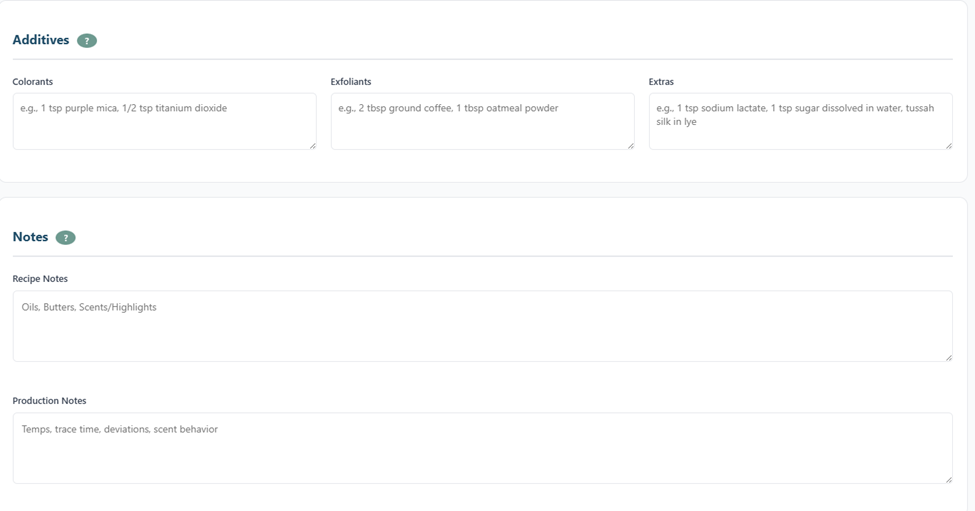
These are free-text fields for your own reference. They print on your recipe and batch worksheet.
- Colorants - micas, oxides. A common starting amount is 1/4-1/2 tsp per lb of oils.
- Exfoliants - ground coffee, oatmeal, pumice, clays, etc.
- Extras - anything else added to the batter or lye water. Common examples: sodium lactate (1 tsp per lb of oils helps unmold faster), sugar or honey dissolved in water (boosts bubbles), tussah silk in the lye solution (adds slip and shine).
Notes
- Recipe Notes - use this for general recipe info: key ingredients, what makes this bar special, etc.
- Production Notes - use this for process details: temperatures at mixing, trace time, scent behavior, any deviations from the recipe, how long you gelled it.
8 Calculation Results
After you click Calculate Recipe, the results section appears. It shows you the four key numbers for your batch:
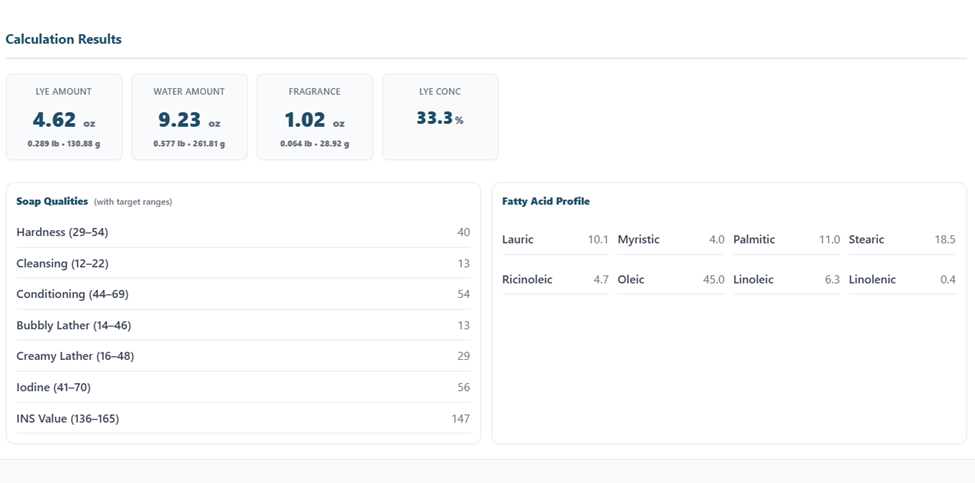
Exact weight of lye (NaOH or KOH) needed for your recipe. Shown in oz, lb, and grams.
How much water to use for your lye solution. Shown in oz, lb, and grams.
How much fragrance or essential oil to add, based on the % you entered.
The concentration of your lye solution (e.g. 33.3% means 33% lye, 67% water).
Each amount is shown in multiple units (oz · lb · g) so you can weigh in whichever unit you prefer.
9 Reading Soap Qualities
Soap Qualities are calculated scores that predict how your soap will behave. Each quality has a target range shown in parentheses. Your recipe's value is shown on the right.
These ranges are a guide, not a rule - some of the best soaps in the world don't fit neatly within these ranges. Use them as a starting reference, not a hard limit.
| Quality | Target Range | What It Means |
|---|---|---|
| Hardness | 29–54 | How firm the bar will be. Short Lasting hardness (lower end) = more water soluble, dissolves more easily. Long Lasting hardness (higher end) = less water soluble, lasts longer in the shower. Hardness = Cleansing + Longevity combined. |
| Cleansing | 12–22 | How well the bar removes oil and dirt. Very high cleansing (especially from excess coconut oil) can feel drying - but a high Cleansing value isn't always a problem. You can balance it by raising your Conditioning value or increasing superfat. |
| Conditioning | 44–69 | How moisturizing the bar feels on skin. Higher conditioning comes from soft oils like olive, avocado, and sunflower. |
| Bubbly Lather | 14–46 | How much lather the bar produces - the big, fluffy, airy bubbles. Coconut oil and castor oil help to boost this number. |
| Creamy Lather | 16–48 | The rich, lotion-like lather. Palm oil, shea, and cocoa butter contribute to creamy lather. |
| Iodine | 41–70 | A measure of how much unsaturated fat is in your recipe. Lower iodine = harder bar, longer shelf life. Higher iodine = softer bar, may go rancid sooner. |
| INS Value | 136–165 | A general score for overall soap quality. Aim close to 160 for a balanced bar. But don't stress too much about this number - a 100% olive oil soap (Castile) or 100% coconut oil soap (with a high superfat) will naturally be way outside this range, and both can be excellent bars. |
10 Fatty Acid Profile
The Fatty Acid Profile shows the breakdown of fat types in your recipe. This is the underlying chemistry that determines the Soap Qualities above.
You don't need to memorize all of these, but here are the most important ones to watch:
- Lauric + Myristic - These fatty acids are found primarily in coconut oil, palm kernel oil, and babassu oil. They create strong cleansing ability and large bubbly lather, but in high amounts they can make soap more drying. Most balanced soap formulas keep the combined level around 12–25% of the fatty acid profile.
- Palmitic + Stearic - These fatty acids come from harder fats and butters such as palm oil, shea butter, cocoa butter, and tallow. They contribute hardness, bar longevity, and a dense creamy lather. A typical balanced soap formula contains about 25–40% combined palmitic and stearic acids.
- Oleic - Oleic acid is common in oils such as olive oil, avocado oil, and high-oleic sunflower oil. It contributes mildness and conditioning, producing a gentle soap with a stable but softer lather. Many soap formulas fall in the range of 30–50% oleic acid.
- Linoleic -Linoleic acid is found in oils like sunflower oil, sweet almond oil, and grapeseed oil. It adds conditioning and a silky skin feel but can shorten shelf life when used in high amounts because it oxidizes more easily. Most soapmakers try to keep linoleic acid below about 10–15%.
- Linolenic - Linolenic acid occurs in oils such as flaxseed oil and hemp seed oil. It is very conditioning but highly unstable and prone to rancidity, so it is usually kept very low in soap formulas, typically below 2–3%.
- Ricinoleic - Ricinoleic acid is found in castor oil. It produces a rich, creamy lather. Soap formulas typically contain about 3–8% ricinoleic acid but it can make for a sticky, slimy feel if you use too much.
| Fatty Acid | What It Contributes | Typical Target Range |
|---|---|---|
| Lauric + Myristic | Cleansing power and large bubbly lather | 12–25% |
| Palmitic + Stearic | Hardness, longevity, and creamy stable lather | 25–40% |
| Oleic | Mildness, conditioning, and gentle stable lather | 30–50% |
| Linoleic | Conditioning and skin feel but increases rancidity risk | <10–15% |
| Linolenic | Very conditioning but highly unstable | <2–3% |
| Ricinoleic | Lather stabilization and bubble persistence | 3–8% |
These ranges are guidelines, not rules.
High levels of these two polyunsaturated fatty acids are the main cause of DOS (Dreaded Orange Spots) - the rancidity that makes your soap smell like crayons or old oil. A yellow DOS warning box will appear automatically if your combined Linoleic + Linolenic goes above this threshold.
11 DOS Risk Warning
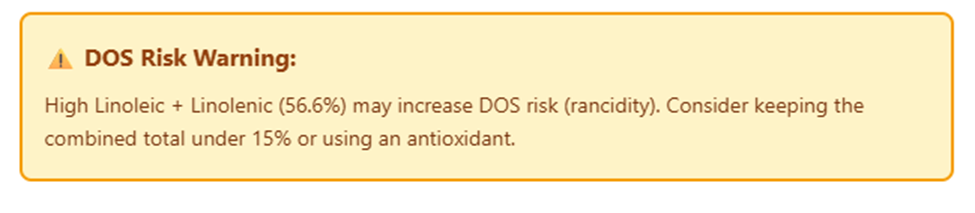
DOS stands for Dreaded Orange Spots - a sign that your soap may start to go a bit rancid. It usually shows up as orange or brown spots, sometimes accompanied by a sour or crayon-like smell.
The main cause is a high percentage of polyunsaturated oils (especially flaxseed, hemp, and sunflower). It's fine to use, its just more aesthetically unpleasing than anything. If this warning appears, consider:
- Reducing or replacing the oil
- Using a water discounted lye solution.
- Adding an antioxidant like Vitamin E to your batch at trace
- Keeping your superfat on the lower side (5%)
- Storing finished bars away from heat, humidity, and light
12 Saving Your Recipe
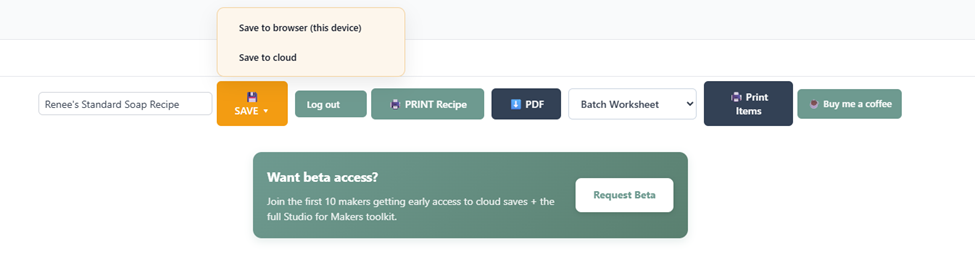
The save bar lives at the bottom of the calculator. Click the SAVE button to choose where to save:
- Save to browser (this device) - saves instantly, no account needed. Only available on this device and browser.
- Save to cloud - saves to your Studio For Makers account. Available on any device. Requires a paid plan.
13 Printing & Exporting
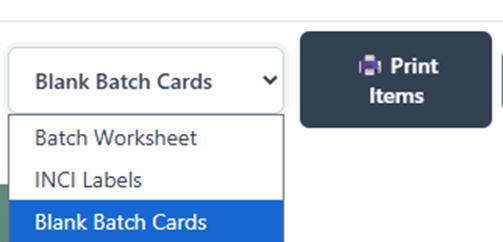
From the save bar, you have several print and export options:
- PRINT Recipe - opens a clean, printable recipe card with all your oils, amounts, additives, and notes.
- PDF - downloads the recipe as a PDF file you can save or share
- Print Items → Batch Worksheet - a production worksheet listing all your batch ingredients and amounts. Great to print and take to your workspace.
- Print Items → INCI Labels - generates ingredient labels using the proper INCI (International Nomenclature of Cosmetic Ingredients) names for your oils. Required for selling soap in many regions.
- Print Items → Blank Batch Cards - blank batch curing record cards you can fill in by hand to keep with your batch.